New App Setup
The whole admin part is currently utilised by the Control Centre admin frontend component of the storage system. To read more about it, click here.
Application part needs to be handled by the new 3rd party app.
Registering a new App Holder (admin part)
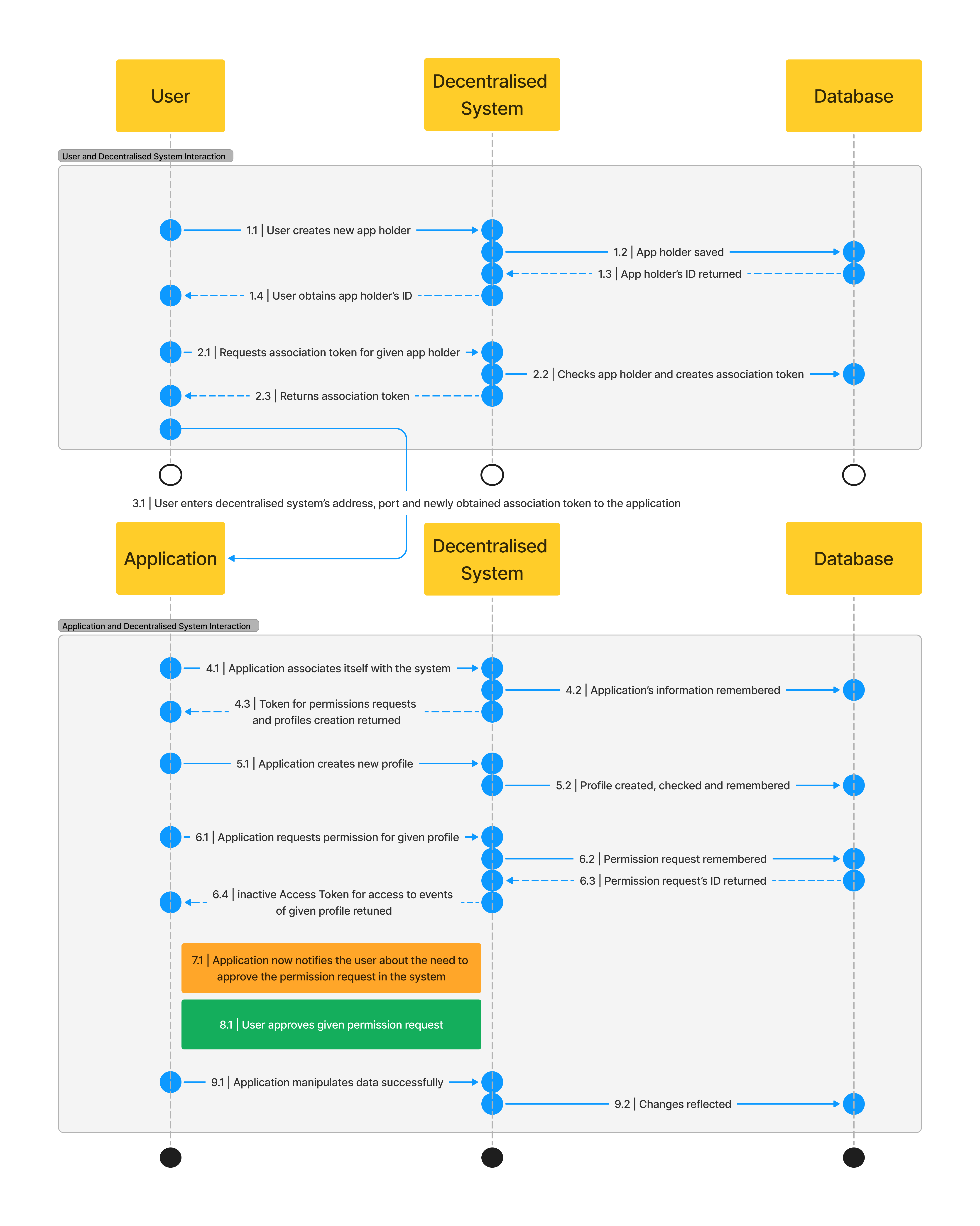
Auth Service is responsible for creating new app holders. These can be understood as some handles for the apps.
To create a new holder, a request to /admin/api/registerNewApp (POST) needs to be made.
Request body should look like this:
{
    "nameDefinedByUser": "My New App"
}
and response is either successful (201 - created or 409 - conflict):
{
    "message": "Application registered successfully.",
    "appHolderId": "65fae0947a90b4a5263a4980"
}
{
    "message": "An application with this name defined by user already exists."
}
Getting association token for App Holder (admin part)
After successfully creating an app holder, the next step involves linking the app to its holder. This is achieved through the generation of an Association Token by the Auth Service. This token serves as a key for the app to establish its association. During the association process, the app is required to provide its unique identifier, which could be, for example, its website domain. This ensures that the app is uniquely linked to its holder, facilitating secure and distinct identification within the system.
After you have an appHolderId acquired from above, you can hit /admin/api/generateOneTimeAssociationToken (POST) request.
Body of that request needs to contain appHolderId:
{
    "appHolderId": "65f85d8f72d3cb5a148a96f6"
}
There are three possible outcomes:
{
    "message": "One-time association token generated successfully",
    "tokenId": "65fae1747a90b4a5263a4984"
}
Second outcome, when the app has already been associated before hitting this endpoint:
{
    "message": "Application has already been associated"
}
Or when the id does not exist and was not created:
{
    "message": "Application not found"
}
Associating app with the App Holder using appHolderId (application part)
You need to hit this endpoint /app/api/associateWithStorageAppHolder (POST) with the following body:
{
    "associationTokenId": "65fae1747a90b4a5263a4984",
    "nameDefinedByApp": "application.com"
}
After the app is successfully associated, associationTokenId is invalidated.
Again, there are multiple kinds of responses:
{
    "message": "App successfully associated with the storage app holder",
    "app": {
        "_id": "65fae0947a90b4a5263a4980",
        "nameDefinedByUser": "My New Application",
        "dateOfAssociationByApp": "2024-03-20T13:18:33.472Z",
        "jwtTokenForPermissionRequestsAndProfiles": "eyJhbGciOiJIUzI1NiIsInR5cCI6IkpXVCJ9.eyJhcHBJZCI6IjY1ZmFlMDk0N2E5MGI0YTUyNjNhNDk4MCIsIm5hbWVEZWZpbmVkQnlVc2VyIjoiTXkgTmV3IEFwcGxpY2F0aW9uIiwibmFtZURlZmluZWRCeUFwcCI6ImFwcGxpY2F0aW9uLmNvbSIsImlhdCI6MTcxMDk0MDcxMywiZXhwIjoxMTE3ODIyMDcxM30.3zHTC0_igQKfzjF8uZadJLkmd4qRXY_hePd_M6pmPj0",
        "dateOfRegistration": "2024-03-20T13:11:48.132Z",
        "__v": 0,
        "nameDefinedByApp": "application.com"
    },
    "jwtTokenForPermissionRequestsAndProfiles": "eyJhbGciOiJIUzI1NiIsInR5cCI6IkpXVCJ9.eyJhcHBJZCI6IjY1ZmFlMDk0N2E5MGI0YTUyNjNhNDk4MCIsIm5hbWVEZWZpbmVkQnlVc2VyIjoiTXkgTmV3IEFwcGxpY2F0aW9uIiwibmFtZURlZmluZWRCeUFwcCI6ImFwcGxpY2F0aW9uLmNvbSIsImlhdCI6MTcxMDk0MDcxMywiZXhwIjoxMTE3ODIyMDcxM30.3zHTC0_igQKfzjF8uZadJLkmd4qRXY_hePd_M6pmPj0"
}
Your app needs to remember jwtTokenForPermissionRequestsAndProfiles from this resposne as it will be useful for profiles and requesting permissions.
You should already have a broader idea of what permissions are for and you will learn more about how to acquire them later in this section.
Or there is a bad response:
{
    "message": "Invalid association token"
}
Congratulations! Your app is now ready! 🎉🎉🎉
You can also see the whole flow of the new application from creating app holder to uploading new events in the following diagram. Although, we haven't described it beyond the initial setup, you can have a look on this diagram to get a bigger picture.