Architecture of the storage backend system
We can see the architecture of the main storage backend system.
There are multiple running components, each having a different set of responsibilities. We won't talk in-depth about them here but the sole purpose of this section is to give you a broad idea of the system.
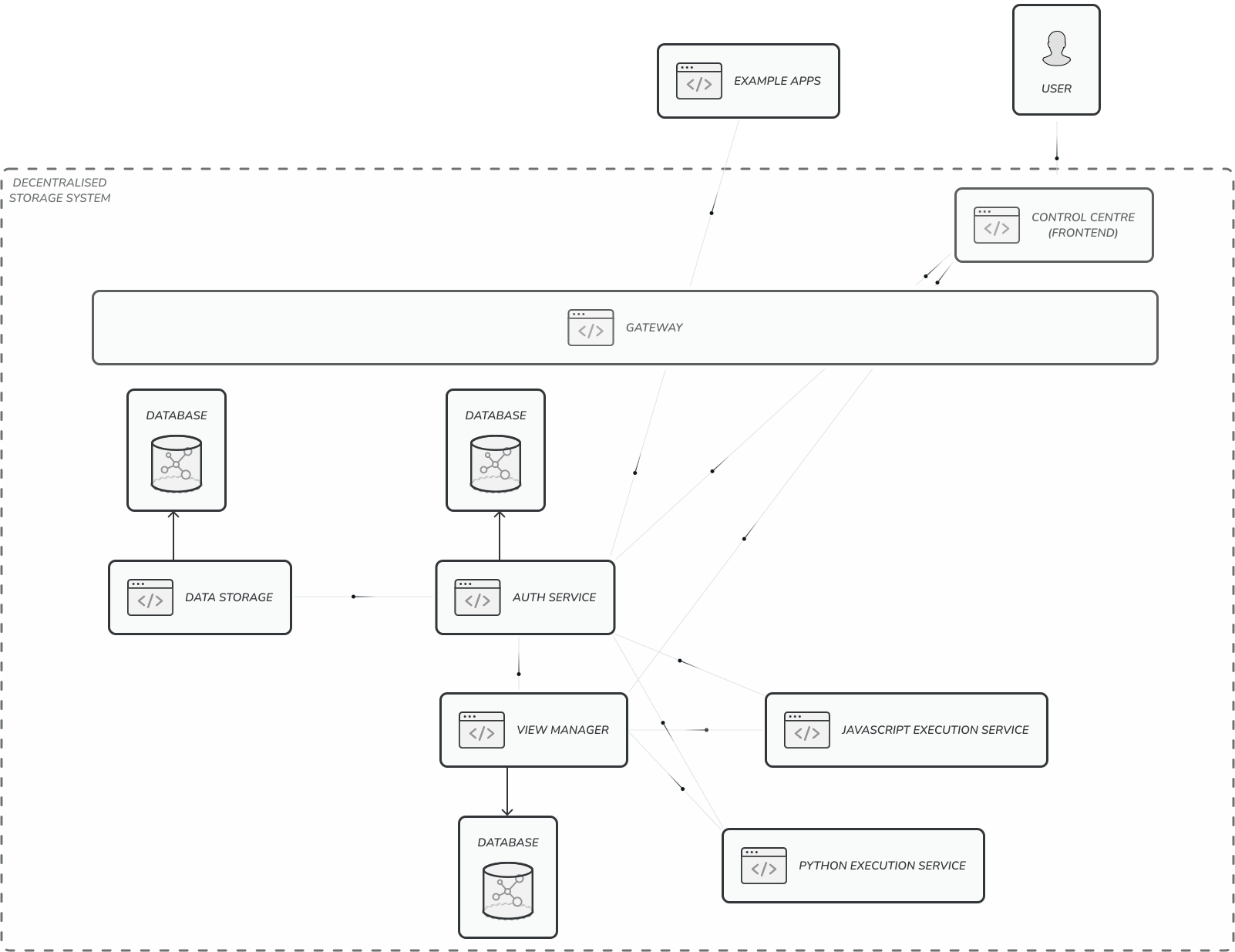
Auth Service
As you can see in the picture abpve, most of the communication between outside world and the storage system goes through the Auth Service. That's because the Auth Service is the component responsible of authenticating individual 3rd party apps and authorising them to process only data they are allowed to.
The whole storage system also needs to be controlled and managed by someone - by a main user - admin. Therefore the auth storage prevents the standard 3rd party apps from accessing admin routes.
Data Storage
This component is the main component for persistent storage of events within our system architecture. It is designed to facilitate the most fundamental operations related to event management, such as storing, manipulating, and deleting events, without any regard for their individual meaning, importance, or structural differences.
It was designed for flexibility and modularity, providing a seamless way for being pretty easily swapped as long as the interface is kept the same in terms of the endpoints the component exposes. We are currently using MongoDB as the main database for storing events. We think it suites this project well as the database is object oriented. This database system offers a blend of efficiency and scalability that is well-suited to our system's needs.
MongoDB's ability to store events in their native format eliminates the need for complex serialization processes, thereby simplifying data storage and retrieval operations.
This component is not limited to MongoDB alone and could basically utilise any other form of database technology. Smart databases which create indexes dynamically based on the query statistics. These smart databases can optimize data access and retrieval processes, significantly improving system performance and responsiveness, especially as the number of events stored has the potential to rise rapidly.
View Manager
View Manager is a component responsible for handling View Templates and View Instances. We will talk more about it later (read the whole View Manager section) but for now it's sufficient to know what they are from the Aspects of system and vocabulary. This component is able to save the templates ( by delegating the actual source code to the particular execution service ). So it's not the View Manager that saves the code. This way it's more flexible and open to different handlings of different source codes based on the programming language and technology used. This also allows for the execution services to be implemented using various technologies based on the code they will be executing.
It's crucial to emphasize that executing third-party source code poses significant risks and requires the utmost caution. This project is not about being able to execute a 3rd party source code securely. As a result, applications are not permitted to directly register the View Template's source code on their own. Instead, they may instruct the user towards downloading the source code from the locations they point to but it's ultimately the user - admin who needs to take a cautious action and register the source code through admin endpoint only. As of now, it's Control Centre frontend component who has the privillege to do that among other things (for in-depth tour of Control Centre click here).
Execution Services
We have provided two execution services for our project, namely Javascript Execution Service and Python Execution Service. However, the architecture is designed to accommodate additional execution services as needed. All that needs to be changed is src/constants/viewsRelated.js code:
const allowedRuntimes = [
    'javascript',
    'python'
]

const runtimeUrlMapping = {
    javascript: process.env.JAVASCRIPT_EXECUTION_SERVICE_URI,
    python: process.env.PYTHON_EXECUTION_SERVICE_URI
};

const getExecutionServiceUrlBasedOnSelectedRuntime = runtime => {
    return runtimeUrlMapping[runtime] || null;
}

// rest of the file
To integrate a new service, simply extend the allowedRuntimes array and the runtimeUrlMapping mapping object with the new runtime's identifier and its corresponding service URI.
Control Centre
This frontend component is used by the user to control the whole backend system without using exposed endpoints directly.
Gateway
The Gateway serves as the primary entry point to the system, controlling access to all runtime components of the system while ensuring that only necessary endpoints are exposed to the public. Auth Service is the only component fully accessible as well as a subset of endpoints related to the management of View Template in View Manager component. Gateway is configured to pass only specific endpoints to the View Manager component. Lastly, the Control Centre component is accessible at /control-centre. To make it easier for user, the root endpoint / is redirected to the Control Centre component.
At this point, you should possess a comprehensive understanding of the backend architecture, enabling you to begin delving into specific components of the system individually. Looking forward to our next interaction discussing this project!